

Dependency Map: see blockers, risks and dependencies together
The Dependency Map draws every initiative in your organization together with what is holding it up: its open blockers, its open risks, and the other initiatives it depends on. It is for the moment a leader asks "if this slips, what else slips?" and wants the answer on one screen instead of in six lists.
What does the Dependency Map show?
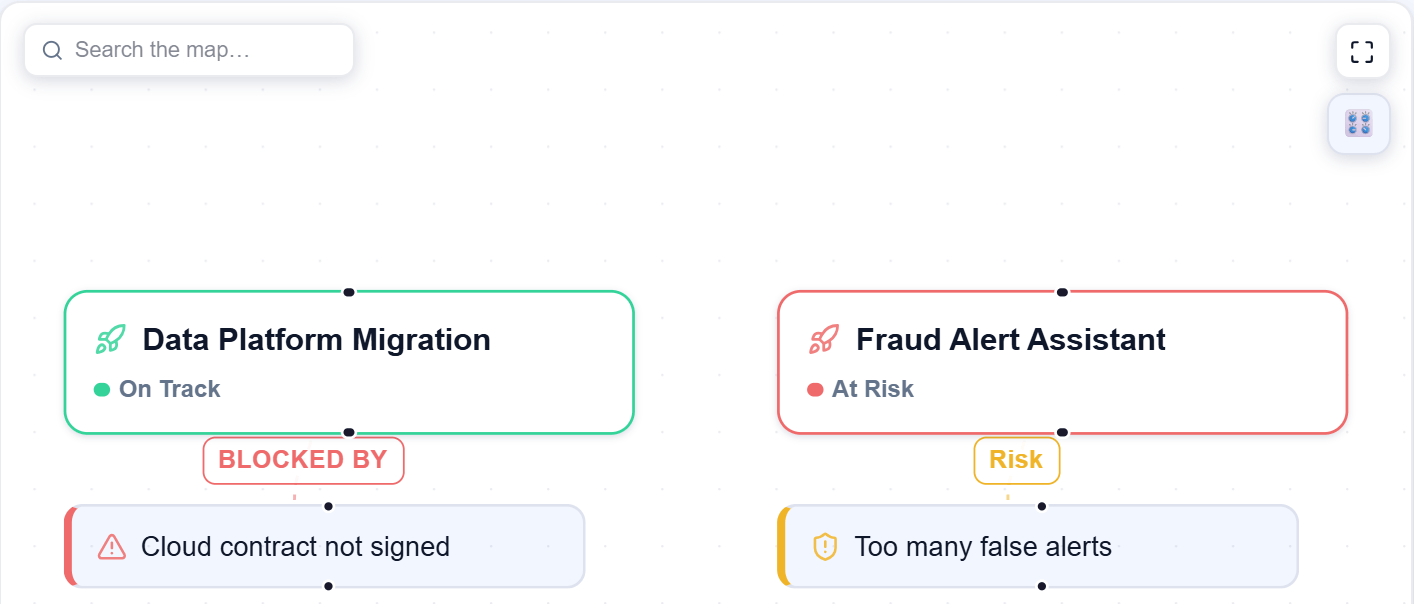
Each initiative is a card with a coloured border and a status label: Planning, On Track, At Risk, Completed or Cancelled. Under it hang the things that are open right now:
- Blockers that are still open, joined to the initiative by a BLOCKED BY line.
- Risks that are not resolved, joined by a Risk line. Critical and high items get a thicker, glowing line.
- Blocks arrows between initiatives, where one initiative has to finish before another can move.
Vendors, policies and people appear as cards only when they connect two or more initiatives, because that is the one thing a plain list cannot show. One used by a single initiative is not drawn. Initiatives are placed from left to right so that the one that blocks comes before the one it blocks.
Every card is a real record. The map does not invent systems, data pipelines or anything else you have not entered.
How do you read and explore it?
Use Map Controls (top right) to switch each kind of card on or off, and to see the colour key for initiative status and risk severity. Type in Search the map to jump to a match, and press Enter to step through the results. The corner button opens a full-screen view, and the zoom, undo and redo buttons sit at the bottom left.
Click any card to open its panel on the right. For an initiative it shows its status, open blockers (with the owner team and whether evidence is linked), open risks, what it is blocked by and what it is blocking, its decision makers and its documents, plus Open Initiative.
You can drag cards to tidy the picture. That only changes your view: moved cards are not saved, and the layout resets when the map reloads.
Who can change things from the map?
Everyone in the organization can see the map. Changes are limited by role:
- Blocker status and owner team. In a blocker's panel press Edit, change the value, review the before and after, then Commit. Any member except a Light Agent can do this.
- Initiative status. The same Edit, review and Commit steps in an initiative's panel. Owners and admins only.
- New dependency. Drag a line from one initiative card to another. The card you start from is the one that blocks the other. A box asks you to confirm, and Confirm only works once you give a reason. Owners and admins only.
The Edit buttons are shown to every member, so an edit you are not allowed to make is refused when you commit it.
What is the What-If Scenario Engine?
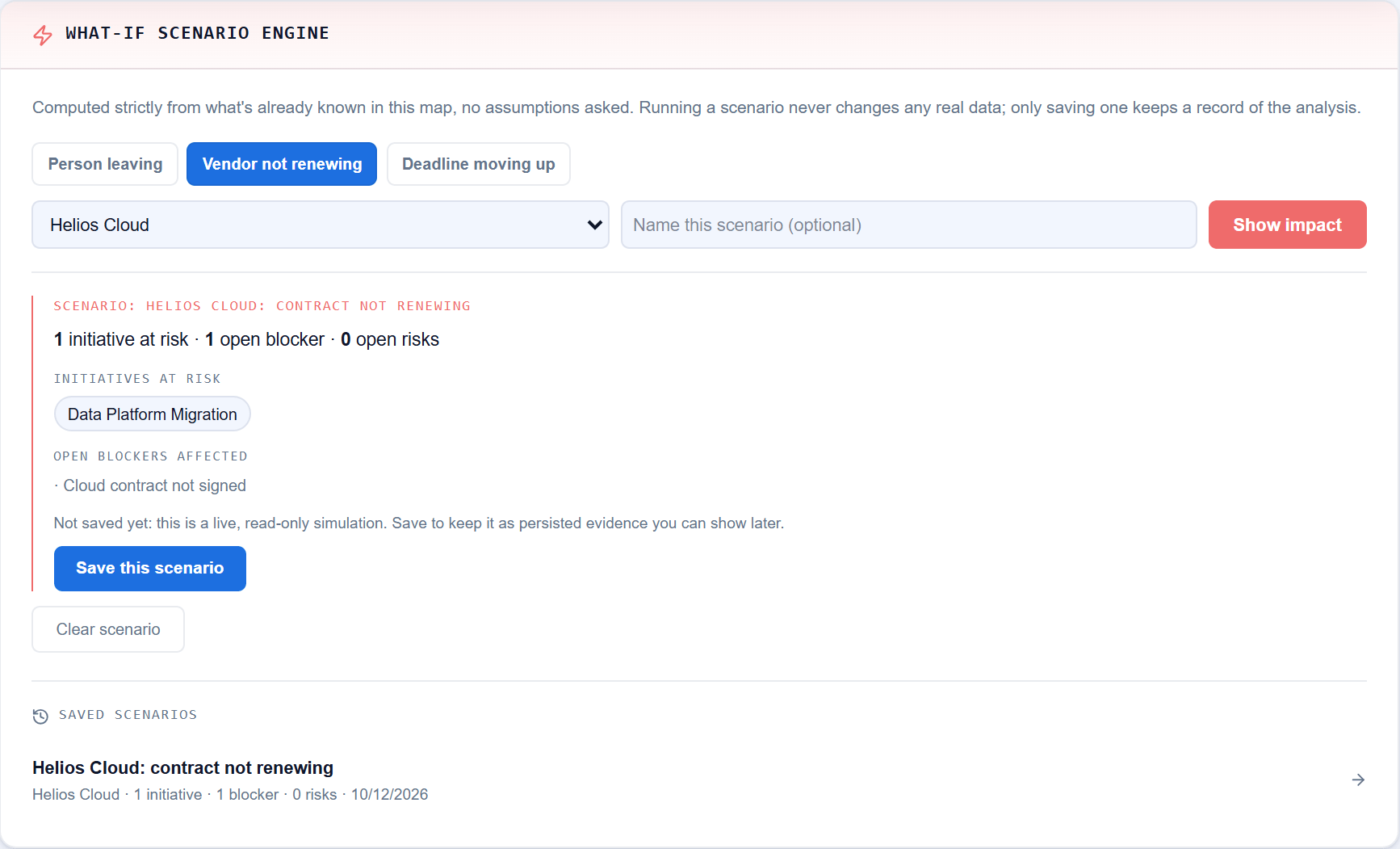
Below the map, the What-If Scenario Engine answers "what would this hit?" Choose one of three:
| Scenario | What it starts from |
|---|---|
| Person leaving | Initiatives where that person owns a risk or made a decision |
| Vendor not renewing | Initiatives linked to that vendor |
| Deadline moving up | Initiatives linked to that policy, directly or through one of their blockers or risks |
Then press Show impact. KlaritiQ follows the open Blocks arrows outward, so anything waiting on an affected initiative is counted too. You get the number of initiatives at risk, open blockers and open risks, with their names, and cards that are not affected are dimmed.
Running a scenario changes nothing. Save this scenario keeps a frozen record under Saved Scenarios, which you can reopen later even after the live map has moved on. If it really happens, an owner or admin can choose This actually happened, set a severity and Confirm & create risk. That creates a real risk in Risks, once per scenario.
Common questions
Why is a vendor, policy or person missing from the map? They are drawn only when they connect two or more initiatives.
Does the Dependency Map use AI? No. The map and the scenario numbers are worked out from the records already in your organization, with fixed rules.
What if it says it could not load? You see Couldn't load the dependency map with a Retry button. It is never shown as an empty map. An organization with no initiatives shows No initiatives yet.
Can a member save a scenario? Yes. Any member can run and save one. Turning a saved scenario into a real risk needs an owner or admin.
To go deeper on one item, read Risks and blockers, or see who is stretched across several initiatives in Capacity.
Was this article helpful?
Community Questions (0)
No questions yet. Be the first to ask!
Still have questions?
Contact support