

Guardrails, the rules that check your compliance every hour
Guardrails are rules that check what KlaritiQ already holds about your organization, every hour, and say plainly whether each rule passes or fails. They exist so a lapsed policy, a missed deadline or an unapproved AI system version is noticed by the product, not by an auditor.
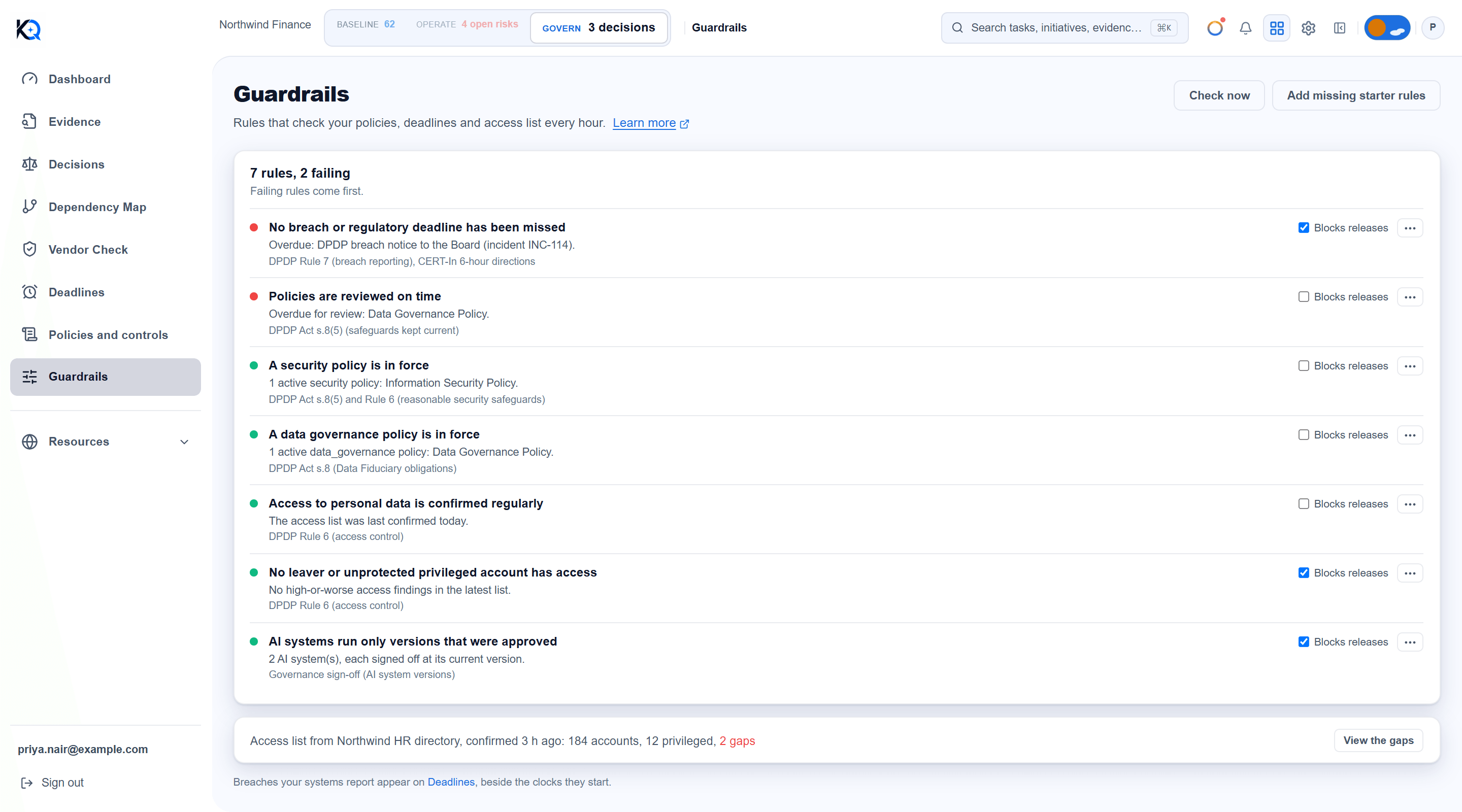
What is a Guardrails rule?
A rule is one named check with a plain result: pass or fail, plus a sentence saying why, for example "Overdue for review: Data Governance Policy." Nothing is scored or estimated, and no AI is involved. Each rule also shows the regulation it relates to, such as DPDP Rule 6.
A rule that cannot be checked fails and says so. For example, "no access list has been received" is a failure, never a pass. A check that looked at nothing would only make the record look better than it is.
What is in the DPDP starter set?
The first time, an owner or admin chooses Switch on the DPDP starter set. That adds seven rules:
| Rule | What it checks | Blocks releases at the start |
|---|---|---|
| A security policy is in force | An Active policy with the category security exists | No |
| A data governance policy is in force | An Active policy with the category data_governance exists | No |
| Policies are reviewed on time | No Active policy is past its review date | No |
| No breach or regulatory deadline has been missed | No clock on Deadlines is breached or overdue | Yes |
| Access to personal data is confirmed regularly | Your identity system confirmed the access list within 2 days | No |
| No leaver or unprotected privileged account has access | No high or worse gap in the latest access list | Yes |
| AI systems run only versions that were approved | Every tracked AI system is signed off at its current version | Yes |
The category must match the policy's category exactly (security, data_governance). Set it on the policy in Policies and controls.
When do the rules run?
Every hour, for each organization that has rules switched on. Rules also re-check right after anyone adds, changes or switches one on or off. Owners and admins can press Check now to run every switched-on rule immediately.
The list puts failing rules first, then passing, then not yet checked, then switched off. A rule that has never run shows as not checked yet. It is neither passing nor failing. Hovering the coloured dot names the state.
When a rule that was passing starts to fail, KlaritiQ alerts the organization's owners and admins once. A rule that fails the first time it is ever checked is shown as failing, but nobody is alerted for a state it never left.
What does Blocks releases do?
Tick Blocks releases on a rule and a deployment pipeline that asks KlaritiQ for a release check is told the release is not allowed while that rule fails. The answer is worked out at the moment of asking, not from the last hourly result. It names the rule's title only. The detail, which may name accounts or people, stays on this page for signed-in users.
A failing rule without that tick still shows here and on the Dashboard card, but stops nothing. The release check also asks for the sign-offs described in AI system versions and sign-offs.
What is the access list panel?
Below the rules, a panel summarizes the latest access list your identity system reported: accounts, how many are privileged, and any gaps (leavers who still have accounts, privileged accounts without multi-factor authentication, dormant privileged accounts). View the gaps lists them by severity. If your system did not report something, the panel says it could not be assessed. Missing information is not treated as fine. Without an access list, the panel points you to Integrations, Webhooks.
Who can change Guardrails?
Everyone in the organization can see the rules and their results. Only owners and admins can use Check now, Add missing starter rules, the Blocks releases tick box, and the menu on each rule (Switch off or Switch on, Remove rule). An organization can have up to 50 rules.
What does Guardrails not do?
- It does not fix anything. It tells you what is failing and why.
- It does not build custom rules from this page. You add the starter set, then tune each rule.
- It does not hold breach reports. Those appear on Deadlines, beside the clocks they start.
Common questions
Why does a rule say it cannot be checked? The facts it needs are missing, usually an access list that has never arrived. It fails until they exist.
I removed a starter rule. Can I get it back? Yes. Add missing starter rules adds back only the ones that do not already exist.
Does a switched-off rule still run? No. It is dimmed, marked (off) and skipped by the hourly check.
What if the page cannot load? It says "Could not load this section" and offers Try again. A failed load is never shown as an empty list.
Was this article helpful?
Community Questions (0)
No questions yet. Be the first to ask!
Still have questions?
Contact support