

Policies and controls, and how to map requirements to policies
Policies and controls is the page in Govern where you record the policies your organization has adopted and the named legal requirements each one covers. It turns "we have a policy" into a checkable link: this policy covers that clause of the DPDP Act, and this other clause has nothing behind it yet.
What is the difference between a policy and a control?
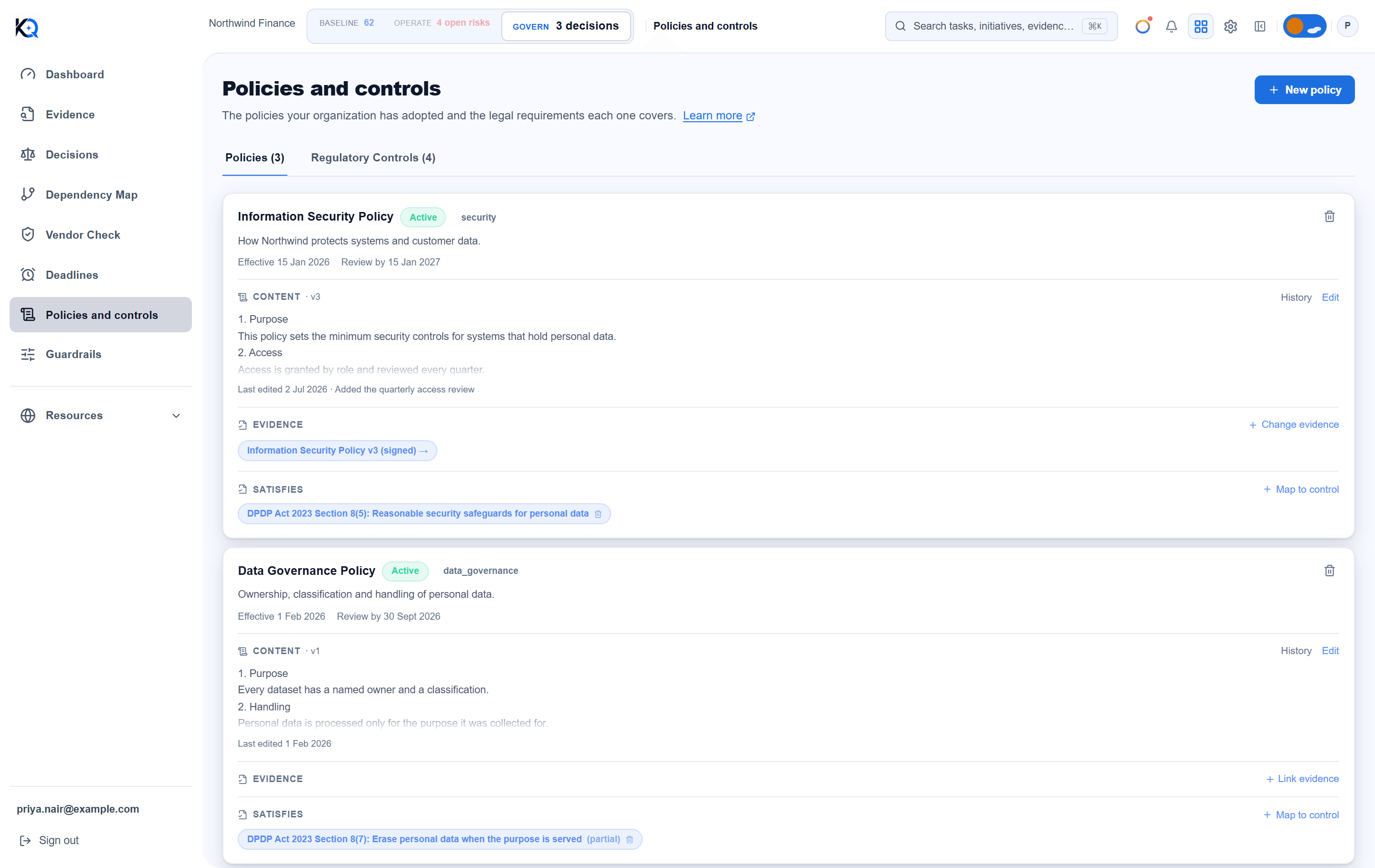
A policy is a document your organization has adopted. Each one has a name, an optional description and category, a status (Draft, Active or Retired), and optional Effective date and Review date fields.
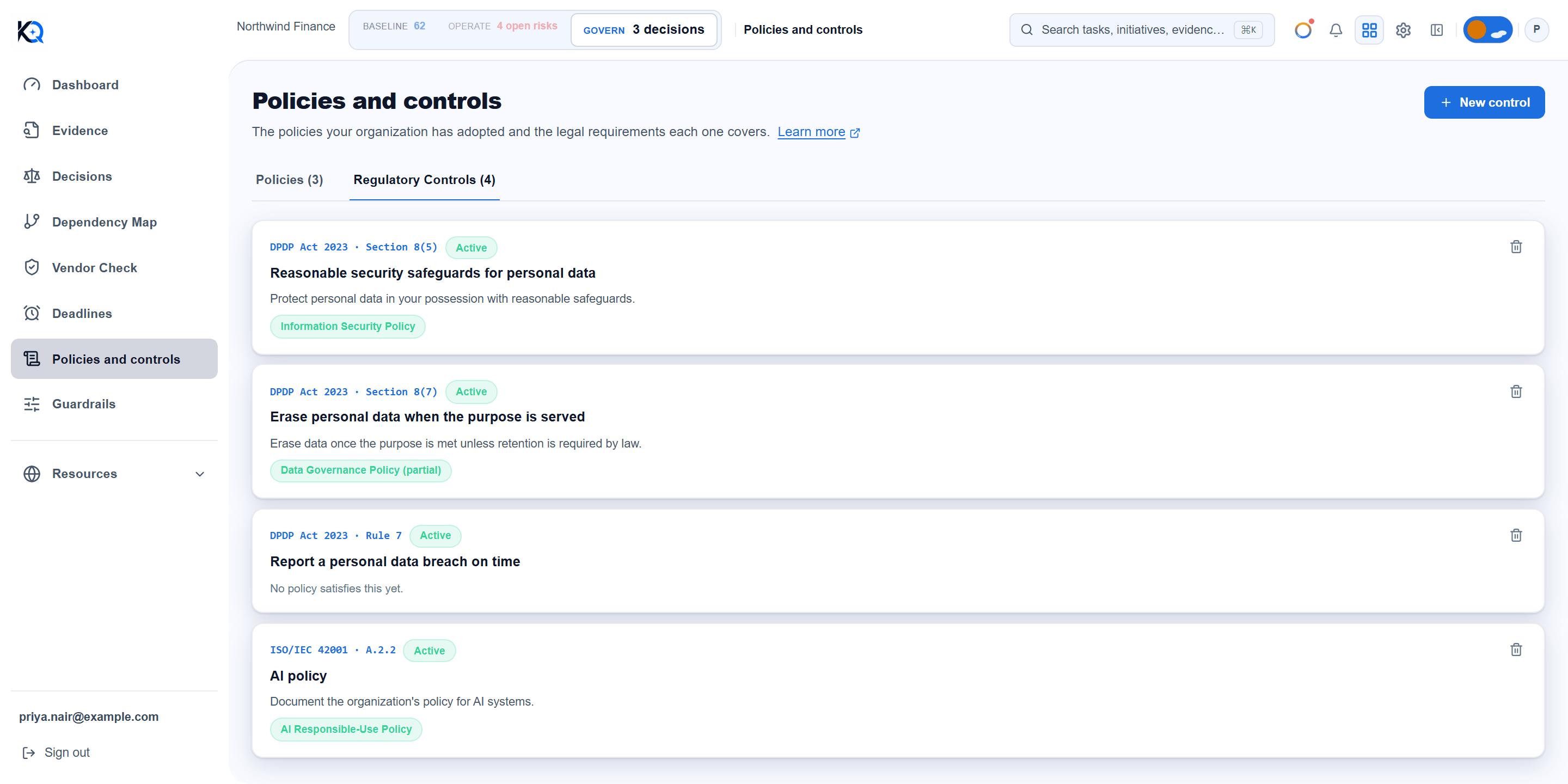
A control is a named requirement a policy needs to meet. The page calls them Regulatory Controls. Each has a framework (for example DPDP Act 2023, ISO/IEC 42001 or Internal), an optional clause reference, a requirement name and a description. KlaritiQ does not pre-load controls, so you add the ones that matter to you.
What does a policy card show?
Each policy card has three parts:
- Content: the policy text. Write policy (or Edit) saves a new numbered version, never an overwrite. History lists every version with its date, the person who saved it and the note you gave under "What changed and why".
- Evidence: a link to a document already uploaded in Evidence. You cannot upload here, so the document lives in one place.
- Satisfies: the requirements this policy is mapped to. A policy KlaritiQ created from a document you confirmed in Evidence carries an Auto-detected from evidence label.
How do I map a requirement to a policy?
- Open the Regulatory Controls tab and choose New control. Framework and requirement name are required.
- Go back to Policies and choose Map to control on the policy card.
- Pick the control, then choose Satisfies or Partially satisfies, and add a note if you want one.
- Choose Save mapping.
Use Partially satisfies when the policy addresses part of the requirement only. To undo a mapping, use the bin icon on its chip. A control with nothing mapped says "No policy satisfies this yet."
What do covered, partly covered and uncovered mean?
The Dashboard card called Policies and controls sorts every Active requirement into one of three states:
- Covered: at least one Active policy is mapped to it as Satisfies.
- Partly covered: no Active policy satisfies it fully, but at least one Active policy partially satisfies it.
- Uncovered: no Active policy is mapped to it.
Only Active policies count. A draft or retired policy covers nothing, even when it is mapped. Retired requirements are left out. The card shows how many requirements are uncovered, a bar per framework, and how many Active policies are past their review date. These are counted from the mappings you make, nothing is guessed. Read more on the Dashboard.
The Regulatory Controls tab lists every mapped policy whatever its status. A requirement can therefore show a policy chip there and still count as uncovered on the Dashboard.
How do review dates work?
An Active policy whose Review date has passed counts as past review on the Dashboard card. The Guardrails rule "Policies are reviewed on time" fails for the same reason. Policies with no review date are never flagged, so set one.
Who can add or remove policies and controls?
Every member of the organization can see this page. Only owners and admins can create or remove policies and controls, write policy content, link evidence and map or unmap requirements. Removing a policy or control asks you to confirm first. Creating, editing and removing policies and controls is recorded in the audit log.
Common questions
Can a draft policy count as coverage? No. Only Active policies count towards covered or partly covered.
Can I change a policy's status or dates after creating it? Not from this page today. Status and dates are set in the New policy form, so check them before you choose Create policy. Content and evidence can be changed at any time.
Does editing a policy overwrite the old text? No. Each save becomes the next version, and History keeps the earlier ones.
Where do I upload the policy document itself? In Evidence. This page only links to documents that are already there.
Was this article helpful?
Community Questions (0)
No questions yet. Be the first to ask!
Still have questions?
Contact support