

Departments: set up teams, see their scores and manage members
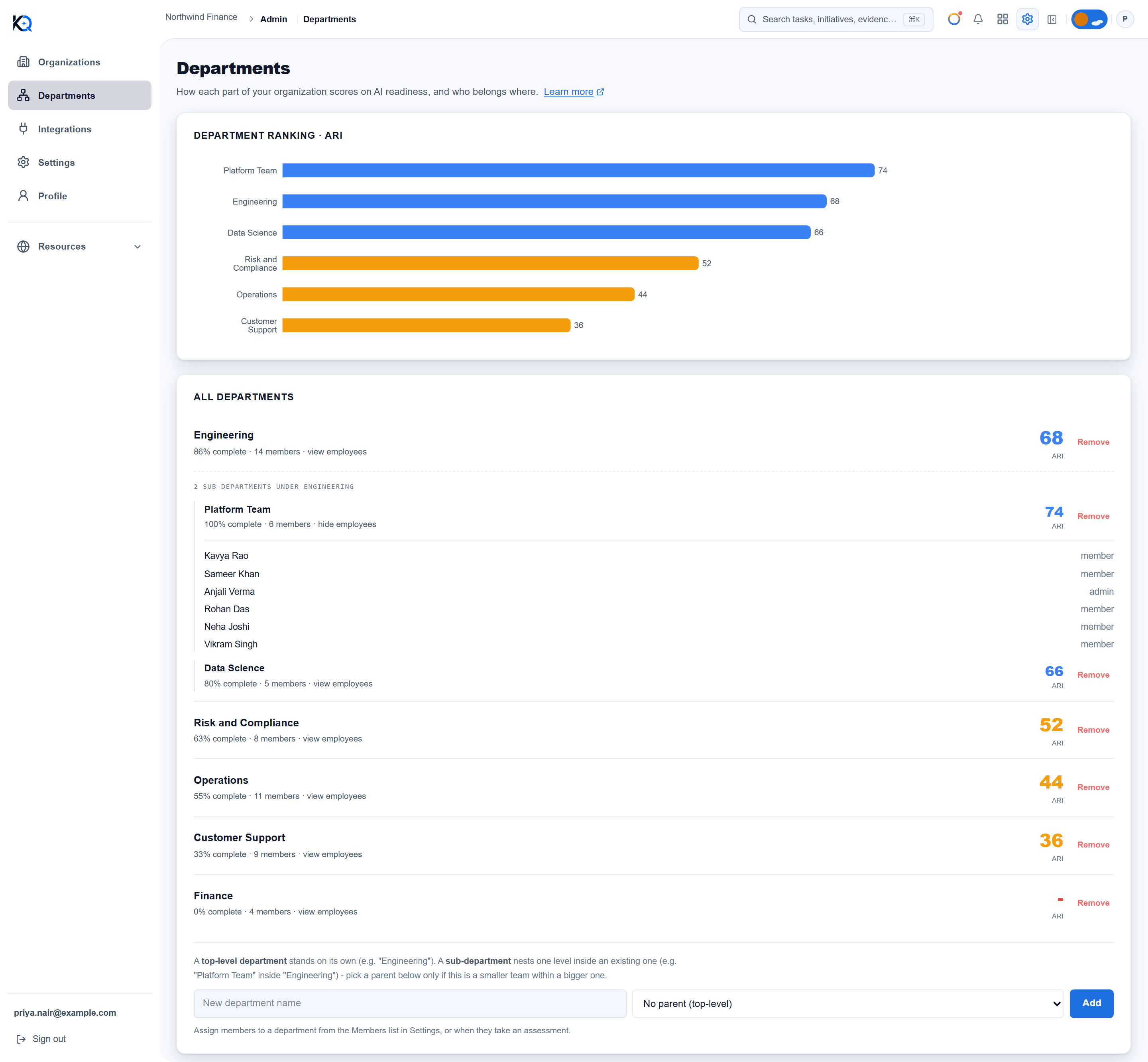
Departments is where you set up the structure of your organization (Engineering, Operations, Risk and Compliance) and see how each part scores on AI readiness. It also shows who belongs where. The score of each department is the average of its members' assessments, so it only fills in as people complete them.
Who can see and change Departments?
Departments is in the sidebar under the admin items. Any member of the organization can open it and read the ranking and the list. Only owners and admins see the Remove buttons and the form to add a department. The list of employees under each department comes from the member list, which only owners and admins can load, so other people do not see names there.
How do I create a department?
- Type a name in New department name. It needs at least two characters.
- Leave the dropdown on No parent (top-level) for a stand-alone department.
- Click Add. A message confirms it.
Each new department is recorded in the audit log.
How do sub-departments work?
Pick a parent in the dropdown, which reads Nest inside followed by the department name. A sub-department such as Platform Team sits inside Engineering. The structure is one level deep: only top-level departments appear as parents, and the server refuses to nest a sub-department under another sub-department. Sub-departments show under their parent as 2 sub-departments under Engineering, each with its own score.
How do I assign members?
Assigning is done in Settings, in the Members list: each member has a department dropdown, with No department as the first choice. The dropdown appears once at least one department exists, and not on the owner's own row. Assessments are also tagged to a department, by default the department the person is assigned to. Click a department row (it says view employees) to see who is in it and their role.
What do the department scores mean?
Each row shows three things:
- ARI, the average readiness score of the latest scored assessment from each person for that department. It shows a dash until there is a score.
- % complete, the share of the department's members who have completed an assessment.
- members, how many active members are assigned.
The Department ranking chart at the top lists scored departments from highest to lowest. The same ranking appears on Reports.
Can I rename Department?
Yes. In Settings, answer What do you call a Department here? with a word such as Division, Team or Practice Area, up to 40 characters. It renames the unit across the app for your organization. Leaving it blank returns it to Department. Only owners and admins can change it.
How does department scoping change what members see?
In Settings, a member who has a department can be set to Sees: own department only. This controls what they can see, not what they can do. It applies to members only: owners, admins and read-only seats are never scoped, and a member with no department set is not restricted.
A scoped member sees initiatives in their own department plus initiatives with no department, and the risks, evidence, documents and capacity numbers linked to those. Work tied to another department's initiative is hidden. The department scores on this page and on Reports are not scoped, and Settings notes that the Command Center AI chat is not covered yet.
Common questions
Why is my new department missing from the ranking? Departments appear in the ranking only once someone has a scored assessment for them.
Can I nest three levels deep? No. Departments allow one level of sub-departments.
What happens when I remove a department? You are asked to confirm and the message says it cannot be undone. The department is hidden from the app and the removal is recorded in the audit log.
Why does the page say it could not load members? The member list failed to load, for example for someone who is not an admin. The department list still shows what it could.
Was this article helpful?
Community Questions (0)
No questions yet. Be the first to ask!
Still have questions?
Contact support