

Reports page: your AI readiness score and momentum over time
Reports is the page where owners and admins read the organization's AI readiness score in one place: the overall score, the profile behind it, how departments compare, and how the score has moved over time. It is built from the assessments your people have completed, so it fills in as they finish them.
Who can open Reports?
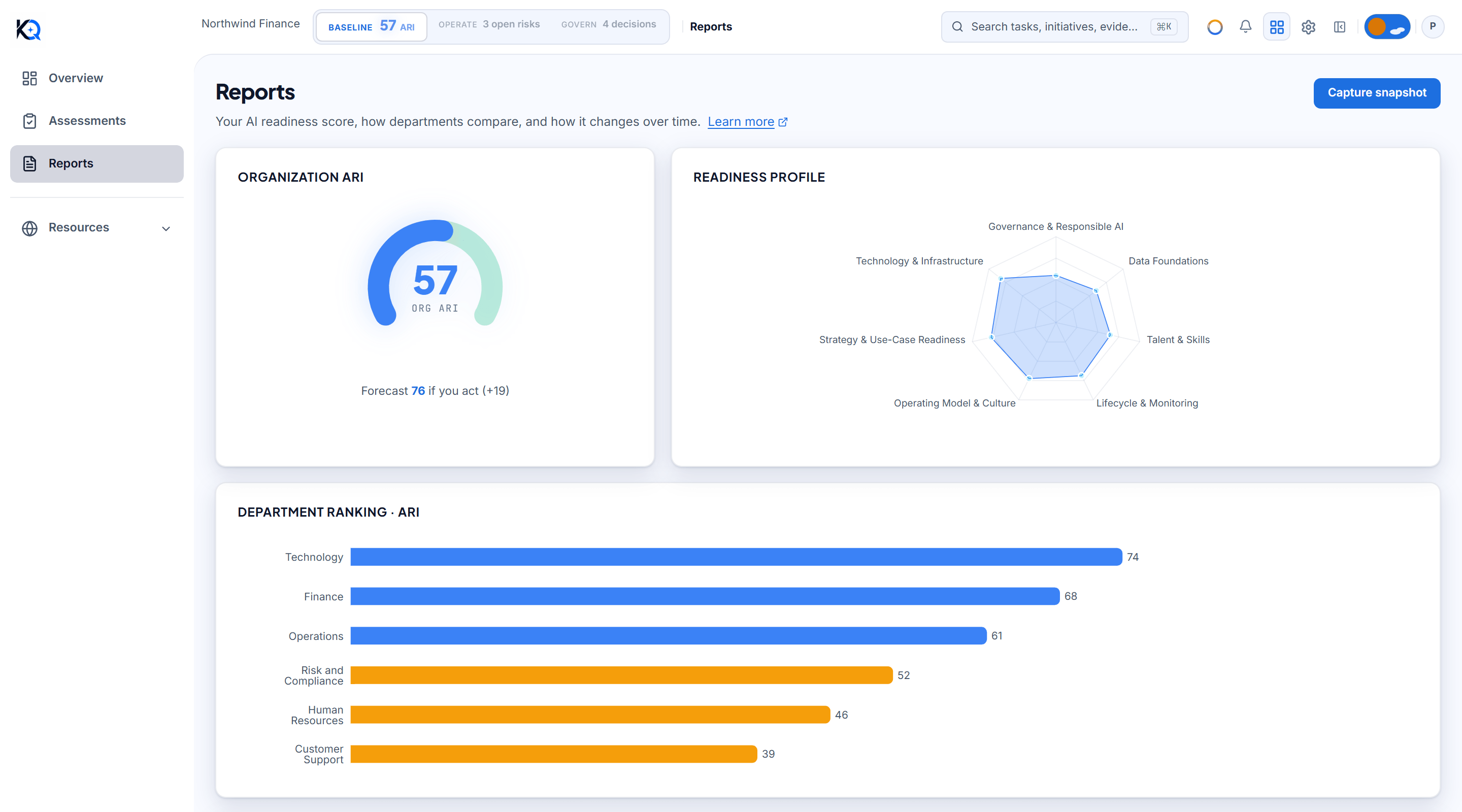
Reports is in the sidebar under Baseline. The page is for owners and admins. Anyone else who opens it sees one line: Reports are available to owners and admins. Only owners and admins also see the Capture snapshot button at the top right.
What does the Organization ARI gauge show?
Organization ARI is the organization's AI Readiness Index, a number from 0 to 100 (see the AI Readiness Index). It is the average of each person's most recent scored assessment, rounded to a whole number. If someone retakes an assessment, the new one replaces their old one in the average. Assessments that carry no 0 to 100 score are left out of the average.
Under the gauge you may see a line such as Forecast 76 if you act (+19). This comes from a fixed formula: take the three weakest dimensions, count 12 percent of each one's distance from 100, add them up (never more than 20 points) and add that to today's score. It is a projection from your own scores, not a promise, and the page says so at the bottom.
What does the Readiness profile show?
Readiness profile is a radar chart with one point per dimension, such as Governance and Responsible AI or Data Foundations. Each point is the average score for that dimension across the same latest assessments. A dent in the shape is a weak dimension. Hover over a point to see its average out of 100.
How are departments compared?
Department ranking lists departments from highest to lowest average ARI. A department's number is the average of the latest scored assessment from each person who assessed for that department. Departments with no score yet are left off the chart, so a new department does not appear until someone has completed an assessment for it. To set departments up, see Departments.
What is Momentum, and why do I need two snapshots?
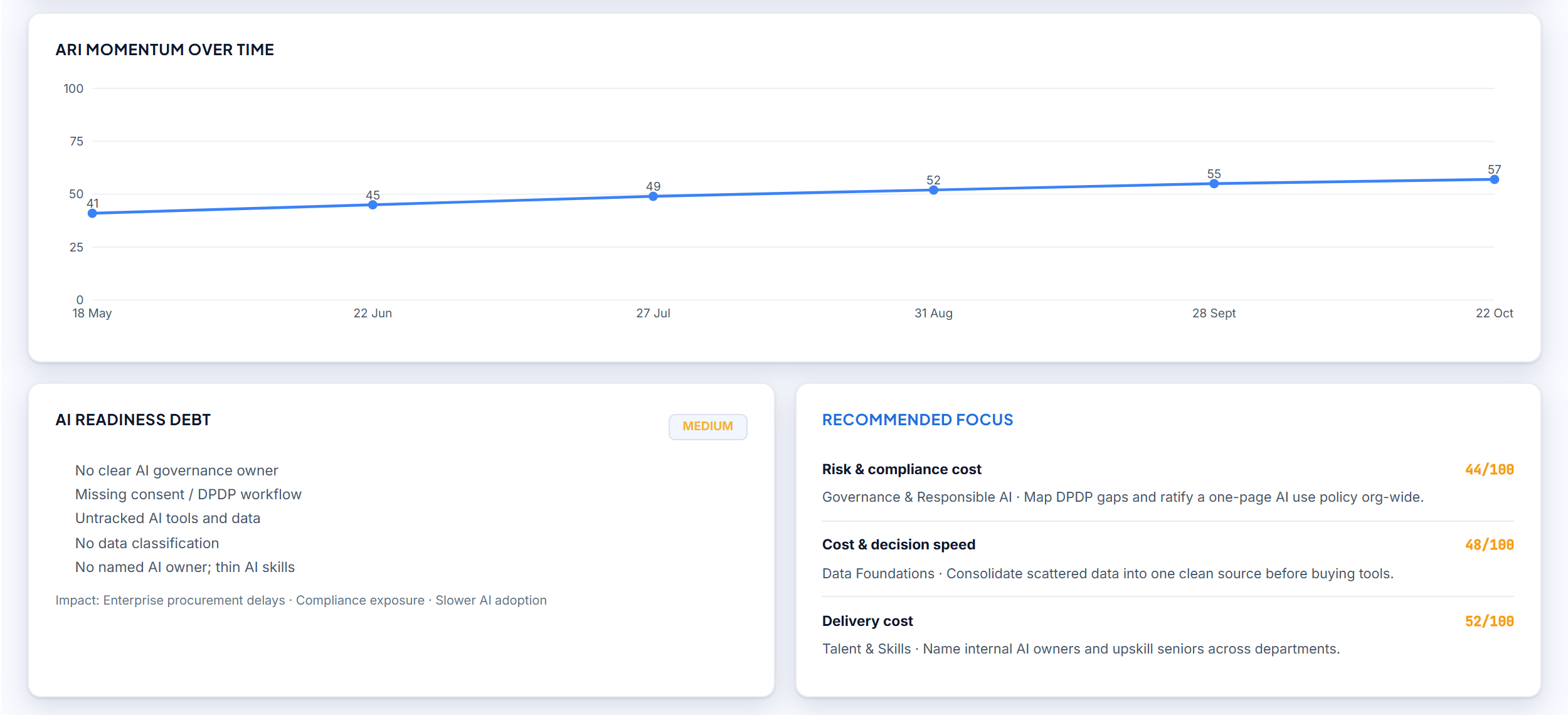
ARI momentum over time plots the organization score at each snapshot. A snapshot is a saved copy of the overall score on a given day. One point cannot draw a line, so until there are two the chart says to capture at least two snapshots.
Snapshots are made in two ways:
- Automatically. When anyone in the organization submits an assessment, KlaritiQ saves a snapshot, at most one in any 24 hours.
- By an admin. Click Capture snapshot. A manual snapshot is always saved, even if one was saved today, and it is recorded in the audit log. A message confirms it: Momentum will plot once you have two.
What are AI readiness debt and Recommended focus?
AI readiness debt is rated Low, Medium or High by fixed rules. It is High when the Governance dimension is under 40 or the overall score is under 40, Medium when the overall score is under 60, and Low otherwise. The bullets under it appear when Governance, Data or the talent and skills dimension scores under 55.
Recommended focus lists the three weakest dimensions with their score out of 100 and a suggested action for each. The wording is written in advance for each type of dimension. It is not generated for your data.
Your assessment report
Below the charts, if you have taken an assessment of your own, a card named Your assessment report shows your score and case reference with an Open full report button. It is shown whether or not the organization charts above it can load.
Common questions
Why is Momentum empty? The chart needs at least two snapshots. Capture one now and another later, or wait for the automatic ones when assessments are submitted.
Why does a department not appear in the ranking? It has no scored assessment yet. Members must complete an assessment for that department first.
What does "Couldn't load your report" mean? The request failed. It does not mean you have no data. Use Retry. If only the readiness debt card fails, that card shows its own Retry link and the rest of the page still works.
Does AI write these numbers? No. The score, forecast, debt level and recommendations all come from fixed rules applied to your assessments.
Was this article helpful?
Community Questions (0)
No questions yet. Be the first to ask!
Still have questions?
Contact support